Notifications
Decide which conversations you hear about and where: in the app, by email, or as push notifications on your devices.
Kontakt notifies you when customers message you and when a conversation is assigned to you, including when an AI agent hands one over. Your notification settings are personal: each team member sets their own under Settings / Notifications, and they apply to your account rather than to the workspace.
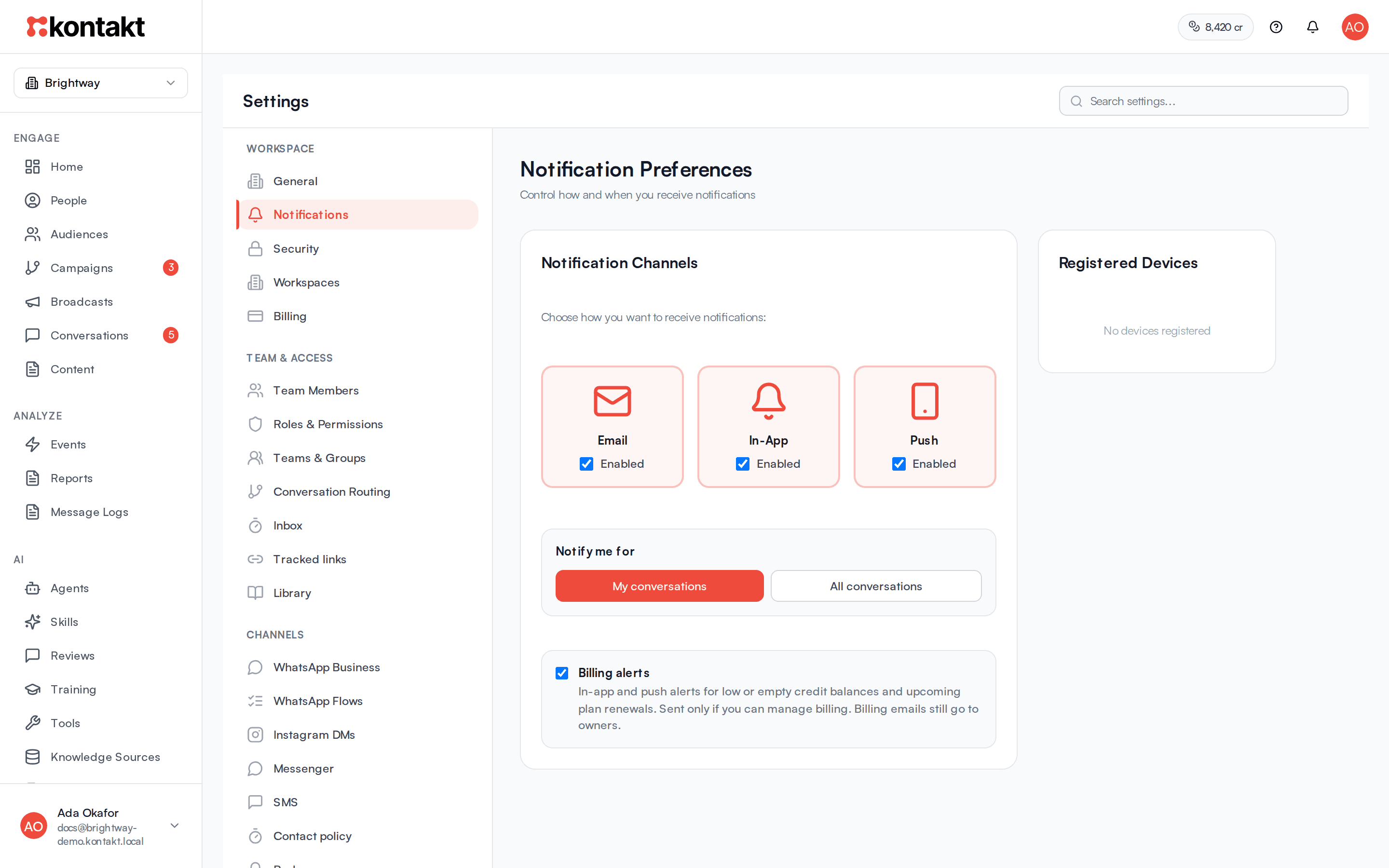
Choose your notification channels
Open Notifications
Go to Settings / Notifications. You can also click the bell in the top bar and choose Notification settings.
Pick channels
Under Notification Channels, tick Email and In-App on or off. For Push, click Enable Push and allow notifications when your browser asks.
Pick which conversations
Under Notify me for, choose My conversations to hear only about conversations assigned to you, or All conversations to hear about every new message in the workspace.
Changes save as soon as you make them.
What you're notified about
| Event | In-App | Push | |
|---|---|---|---|
| A new customer message in a conversation assigned to you | Yes | Yes | No |
| A new customer message in any conversation, when you chose All conversations | Yes | Yes | No |
| A conversation is assigned to you | Yes | Yes | Yes |
| An AI agent escalates a conversation to you | Yes | Yes | Yes |
| Your credit balance drops below an alert level, or runs out | Yes | Yes | Yes |
| A plan renewal is 7 days or 1 day away | Yes | Yes | Yes |
Each event only uses the channels you have turned on. Billing events are the exception for email, see below.
All conversations covers every workspace you're an active member of, not only the one you signed up in. If an admin deactivates you in a workspace, you stop getting notifications from it and aren't assigned its conversations.
- New messages. The notification shows the customer's name and a preview of the message. You aren't notified about a new message while you have that conversation open.
- Assignments. The notification reads Conversation assigned, or AI escalated a conversation to you when an AI agent handed it over. Email is only sent for assignments, never for individual messages.
Billing alerts
Low balance, out of credits, and renewal reminder notifications go only to people who can manage billing: the workspace owner and members whose role can update settings. In a partner account, partner members get alerts about the partner balance and customer balances.
To stop the in-app and push billing alerts for yourself, untick Billing alerts under Notification Channels. Billing emails are sent to owners and admins whatever your channel settings, because they cover payments and service interruptions. To choose when balance alerts fire, see Balance alerts.
In-app notifications
In-app notifications appear under the bell in the top bar, with a count of new ones. Click a notification to open that conversation, or Billing for a billing alert. When there's nothing new, the menu says No new notifications.
Push notifications
Push notifications appear on your computer or phone even when Kontakt isn't open in front of you.
- Click Enable Push under Push and allow notifications in your browser.
- Your browser appears under Registered Devices.
- Repeat on each browser or device where you want notifications.
To stop push on a device, click the bin icon next to it under Registered Devices. To stop push everywhere, untick Push. Signing out also stops push notifications in that browser until you turn them on again.
Troubleshooting
I clicked Enable Push but nothing happened
Your browser blocked the permission request, or notifications are turned off for Kontakt in your browser or operating system settings. Allow notifications for the Kontakt site, then click Enable Push again.
I'm not getting notified about new messages
Check Notify me for. With My conversations, you only hear about conversations assigned to you. Unassigned conversations don't notify you until someone assigns them. Choose All conversations to hear about everything, or set up routing so conversations are assigned automatically.
I don't get notification emails for messages
That's expected. Kontakt only emails you when a conversation is assigned to you.