Add-ons
Your plan includes a set number of 360dialog WhatsApp channels, phone numbers, and connected email inboxes. Add-ons let you go beyond that for a monthly fee.
Add-ons are extra units of three things: WhatsApp channels through 360dialog, phone numbers, and connected email inboxes. Each plan includes some of each. Paid plans can buy more, billed monthly with the plan fee.
The three add-ons
| Add-on | What counts |
|---|---|
| WhatsApp channel (360dialog) | Each WhatsApp number connected through 360dialog (BSP). Numbers connected through Direct Meta (Cloud API) are free on every plan and never counted. |
| Phone number | Each phone number Kontakt provides for voice and SMS, until it is released |
| Connected email inbox | Each connected Gmail or Microsoft 365 inbox that is active or needs to be reconnected |
Your allowance for each is what your plan includes plus any extra units you bought. The monthly price per extra unit is shown next to each add-on in Billing.
Before you start
- Add-ons need a paid plan. On the trial and Pay as you go, you can't buy add-ons, connect WhatsApp through 360dialog, or get phone numbers. Direct Meta WhatsApp works on every plan.
- To change add-ons, your role needs the Settings permission set to Update.
- If a renewal payment is overdue, pay it first. Add-ons can't be changed while a payment is outstanding.
See your allowances
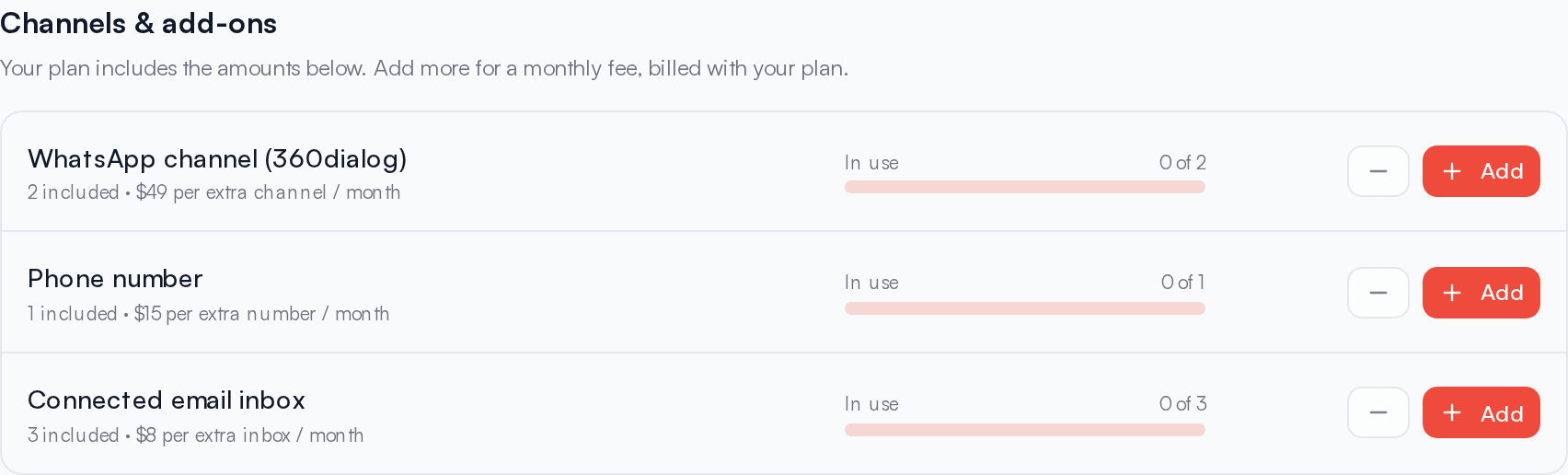
Go to Settings / Billing and find Channels & add-ons. Each row shows:
- How many units your plan includes, plus any extras you pay for, for example "1 included + 2 extra".
- The price per extra unit per month.
- In use: how many you are using out of your allowance.
Below the list, Billing shows your total add-on cost per month, for example "Add-ons: $X / month".
On the trial and Pay as you go, this section explains that 360dialog WhatsApp, phone numbers, and more inboxes need a paid plan, with a See plans button on each row.
If a partner manages your workspace, the section reads "What your plan includes. Ask (partner) if you need more." and has no Add buttons.
Add a unit
Click Add
In Channels & add-ons, click Add on the add-on you need. A dialog titled with the add-on name opens, for example Add WhatsApp channel (360dialog).
Review the cost
The dialog shows units in use, units included in your plan, the extra units you will have after the change, and the new Monthly add-on cost. It also shows what you pay now:
- If there is time left in the current period, you pay for the rest of that period now, for example "$X is charged now for the rest of this period, then $Y per channel each month with your plan from (date)."
- If the amount for the rest of the period is very small, you see "Nothing to pay now. It's added to your next renewal."
Confirm
If you have a saved card, click Confirm and it is charged straight away. Without a saved card, pick Card or Local checkout and click Continue to payment. The extra unit is added once the payment clears, and the card you pay with is saved for renewals.
From the next renewal, each extra unit is charged at its full monthly price together with your plan fee.
You can also buy a unit at the moment you need it. If you try to connect a 360dialog number or an inbox when your allowance is used up, Kontakt shows a message such as "All 1 of your 360dialog WhatsApp channels are in use. Add another for $X/month, or connect through Meta directly at no extra cost." From there you can add a unit, or for WhatsApp click Use Meta direct instead.
Remove a unit
Free up the unit first
You can't remove extra units you are still using. Disconnect the WhatsApp number, release the phone number, or disconnect the inbox first.
Click the minus button
In Channels & add-ons, click the minus button on the add-on. The remove dialog shows the new totals and "Takes effect now. There is no refund for the rest of this period."
Confirm
Click Remove. The unit is removed immediately and is no longer included in your renewal.
If the minus button is disabled, you either have no extra units or every extra unit is in use. In the second case, hovering over it shows "Disconnect one first".
Over your allowance
You can end up using more than your allowance, for example after your plan moves to Pay as you go or you switch to a plan that includes fewer units. When that happens:
- Billing shows "You're using more than your plan allows" with the counts.
- Everything already connected keeps working.
- You can't connect more until you add units or choose a paid plan.
- Connected email inboxes over your allowance are charged from your credits once per calendar month, at the inbox add-on price. They appear in Credit activity as Email mailbox overage.
To stop the inbox charge, disconnect the extra inboxes or add inbox units.
When add-ons end
Add-ons are reset to zero when your plan moves to Pay as you go, whether you switched yourself, turned off Auto-renew, or a renewal payment wasn't made before the grace period ended. See Renewals and invoices.
Plans arranged with Kontakt
If your plan was set up by Kontakt rather than paid in the app, such as Enterprise, adding units goes through Kontakt. You see "Add-ons on this plan are arranged with Kontakt. Contact support to change them."
Troubleshooting
I see "Upgrade to continue" when connecting WhatsApp
Your plan can't hold 360dialog channels. Choose a paid plan with See plans, or connect with Direct Meta (Cloud API), which is free on every plan.
"Your saved card was declined"
The unit isn't added. Remove the saved card in Billing, then add the unit again. Without a saved card you go through checkout, and the new card is saved. See Renewals and invoices.
"Pay the outstanding renewal before changing add-ons"
Your subscription is past due. Pay the renewal from the banner at the top of Billing, then try again.
Payment is processing
Some card payments take a moment to clear. You see "Payment is processing. The add-on applies once it clears." Check back in a few minutes.