Integrations overview
Kontakt connects to your other systems in a few distinct ways. This page explains each one and helps you pick the right one for the job.
Integrations do one of three jobs. They bring data in (people, orders, events), they let your AI agents and journeys act in another system, or they deliver something outside Kontakt, such as a reward or a push notification. Most teams use two or three of these together.
Pick the right integration
| You want to | Use | Set up in |
|---|---|---|
| Sync a Shopify store's customers, orders, and checkouts, and let agents search the catalog | Shopify | Settings / Connectors |
| Turn a JSON payload another system already sends into a customer event, without writing code | Webhook sources | Settings / Webhook sources |
| Send people, events, leads, orders, or consent from your own backend | Developers: ingestion | Settings / API Keys |
| Let an AI agent call your own API during a conversation | Custom API tools | Settings / Connectors |
| Call any HTTP endpoint from a journey step | API Call step | The journey builder |
| Keep agent knowledge in sync with Google Docs, Sheets, Slides, or files | Google Drive | AI / Knowledge Sources |
| Pay out airtime, data, mobile money, or bank transfers from a journey | Fulfillment providers | Settings / Fulfillment Providers |
| Send app push notifications from a journey | Push | Settings / Push |
| Send WhatsApp from Customer.io campaigns and get replies, opt-outs, and delivery back | Customer.io | Settings / Connectors |
| Work alongside another marketing platform you already use | Marketing platforms | Webhook sources, the API, and API Call steps |
Data in
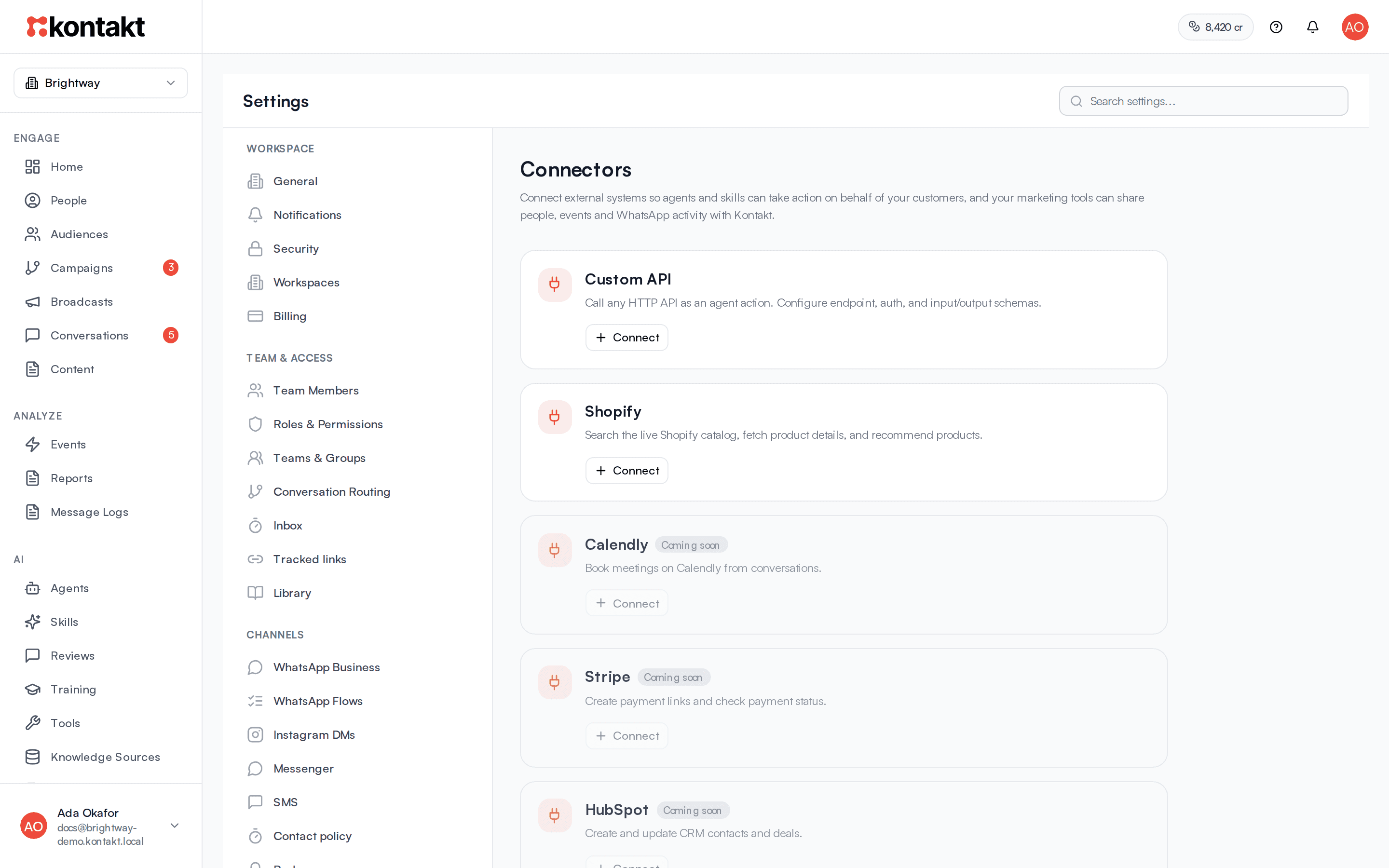
Connectors. Settings / Connectors lists the systems Kontakt connects to directly. Today you can connect Shopify, Custom API, and Customer.io. Cards marked Coming soon cannot be connected yet. Shopify brings in customers, orders, and checkouts as events your journeys and audiences can use. See Shopify. Customer.io sends people and events in, and gets WhatsApp replies, opt-outs, and delivery back. See Customer.io.
Webhook sources. If a system can post JSON to a URL, a webhook source turns each post into a customer event. You choose which field identifies the person and what the event is called. No API key and no code are needed on the sending side. See Webhook sources.
The Kontakt API. For your own backend, the public API at https://api.usekontakt.com/v1 accepts customers, events, leads, orders, consent, and identity merges. It uses an API key from Settings / API Keys. See Developers.
Every source of events, whether a Shopify store, an API key, or a webhook source, appears under Events / Sources. You can switch off a whole source, or one event from a source, when the same activity arrives twice. See Events.
Agents and journeys acting in other systems
Custom API tools. Add an endpoint under Connectors and it becomes a tool your AI agents can call, once you allow it on a skill. Use this for lookups and actions during a conversation, such as checking an order in your own system or creating a ticket. See Custom API tools.
API Call journey step. A journey can call any HTTP endpoint with headers, authentication, optional HMAC signing, retries, and a timeout. The response is available to later steps. Use this to notify another system, fetch data for a message, or write back a result. See The API Call journey step.
Shopify actions. With Shopify connected, journeys can credit or reverse Shopify store credit, and agents can search the live catalog. See Shopify.
Content for your AI
Google Drive. Connect a Google account and add Docs, Sheets, Slides, PDFs, and other supported files as knowledge sources. Kontakt watches each file and re-syncs it when it changes. See Google Drive.
Delivering outside Kontakt
Fulfillment providers. The Disburse Reward journey step sends airtime, data bundles, mobile money, or bank transfers through a provider you configure, or calls your own webhook. See Fulfillment providers.
Firebase push. Paste a Firebase service account under Settings / Push, register devices from your app through the API, and use the Send Push step in journeys. See Push and Register a device for push.
What is not available
- Outbound webhook subscriptions. You cannot yet subscribe your own URL to Kontakt events from the app. To send data out today, use an API Call step in a journey. See Webhooks.
- Native connectors for other marketing platforms. Customer.io is the only marketing platform with a connector. Tools such as Braze, MoEngage, or Segment connect through webhook sources, the API, and API Call steps. See Marketing platforms.