Plans
Your plan sets your limits and your monthly fee, and can include credits each period. Here is how each plan works and what happens when you change plans.
Every workspace is on exactly one plan. The plan decides how many team seats and contacts you can have, how much knowledge your agents can draw on, which channels you can connect, and how many credits are included each period.
Compare plans
| Plan | Monthly fee | Included credits | Seats | Contacts | Knowledge | Emails / month |
|---|---|---|---|---|---|---|
| Trial | $0 | 500 ($5) | 2 | 500 | 20 MB | None |
| Starter | $79/mo | 1,500 ($15) | 5 | 3,000 | 100 MB | 5,000 |
| Pay as you go | $0 | None, buy as needed | 5 | 3,000 | 100 MB | None |
| Growth | $249/mo | 10,000 ($100) | 15 | 25,000 | 500 MB | 25,000 |
| Scale | $799/mo | 40,000 ($400) | 50 | 100,000 | 2 GB | 100,000 |
Live from the Kontakt price catalog. Enterprise plans are priced per contract.
Emails / month is the broadcast and journey email included each period. See Channel pricing for email beyond it.
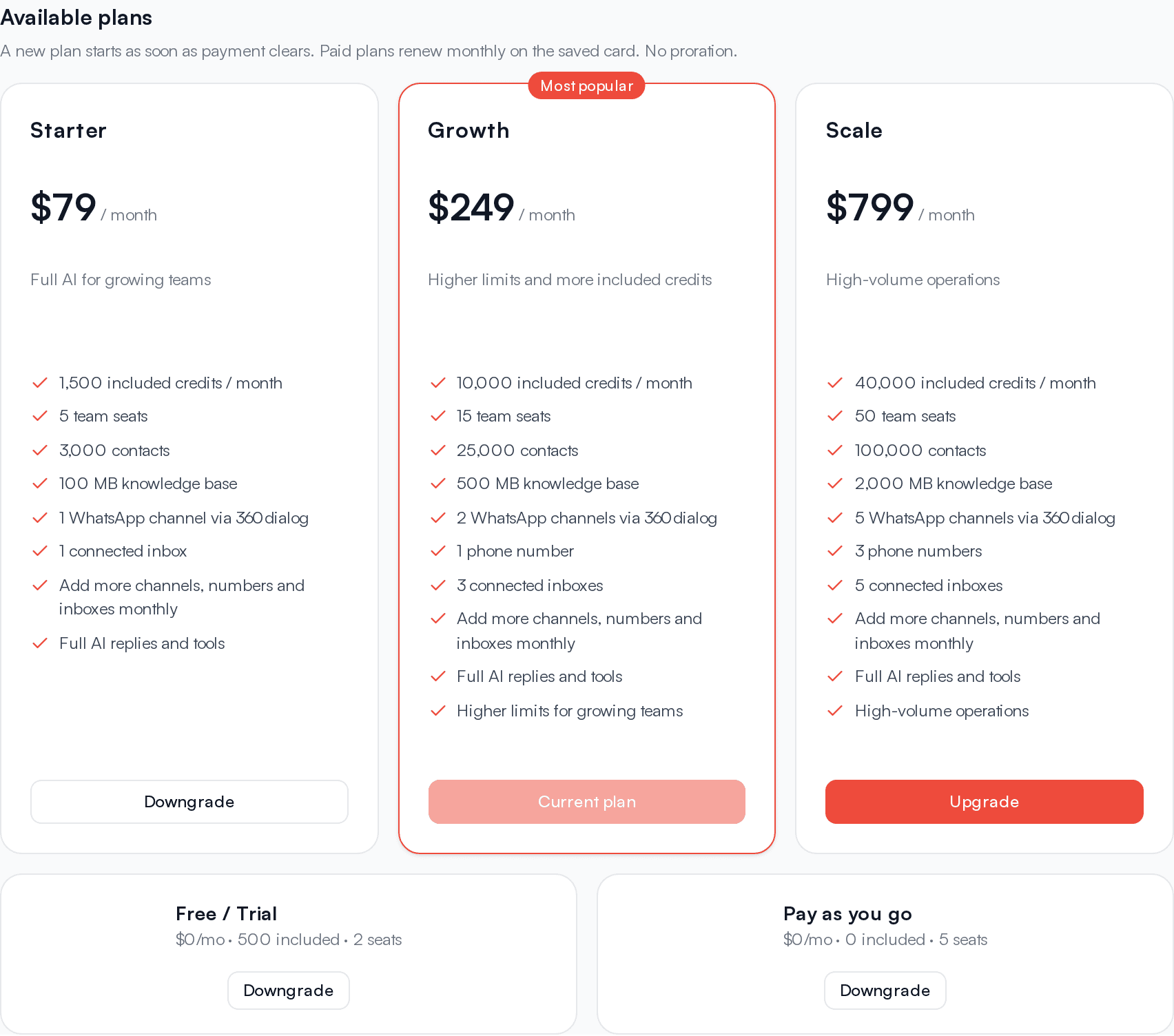
Each plan also includes a number of WhatsApp channels through 360dialog, phone numbers, and connected email inboxes. You can see your plan's allowances under Channels & add-ons in Billing, and on each plan card under Available plans. See Add-ons.
For per-message rates, see /pricing/rates.
Trial
Every new workspace starts on the trial. You don't need a card.
- The trial lasts 30 days and includes the trial credits shown in the table above.
- New workspaces also get a one-time Signup bonus of credits. Signup bonus credits don't expire.
- Trial included credits expire when the trial ends.
- When the trial ends, the workspace moves to Pay as you go automatically. Nothing is charged.
- On the trial you can connect WhatsApp through Direct Meta (Cloud API), which is free on every plan. WhatsApp through 360dialog and phone numbers need a paid plan.
Pay as you go
Pay as you go has no monthly fee and no included credits. You buy credits when you need them and spend them on AI replies and paid messages. It has the seat, contact, and knowledge limits shown in the table.
Pay as you go can't hold add-ons, so you can't connect WhatsApp through 360dialog or get phone numbers on it. Direct Meta WhatsApp works on every plan.
Paid plans
Paid plans charge a monthly fee and include credits every period. A paid plan:
- Starts as soon as payment clears and runs for 30 days.
- Adds the plan's included credits at the start of each period.
- Renews automatically on your saved card for the plan fee plus any add-ons. See Renewals and invoices.
- Can hold add-ons: extra 360dialog WhatsApp channels, phone numbers, and connected inboxes.
Enterprise
Enterprise plans are set up by Kontakt with custom contacts, seats, and terms. You can't buy Enterprise from the app. Talk to us to get started. Enterprise and other plans arranged with Kontakt are not charged to a card, and add-on changes on those plans go through Kontakt support.
Change your plan
Open Billing
Go to Settings / Billing and scroll to Available plans. You can also click Manage plan in the Current plan card, which opens the next plan up.
Pick a plan
Click Upgrade or Downgrade on the plan you want. Your current plan shows Current plan and can't be selected. The Change plan dialog opens with the plan's monthly fee and included credits.
Choose a payment method
Pick Card to pay in USD, or Local checkout to pay in your local currency, converted at payment. With local checkout the dialog shows the exact local amount and the exchange rate before you continue.
Pay
Click Continue. You are taken to a secure checkout page. When payment completes you return to Billing and see "Payment received. Credits and plan updates may take a moment to appear."
If you pay with a card, it is saved and charged automatically each period for the plan and any add-ons. You can turn off Auto-renew at any time.
How plan changes work
No proration
Plan changes don't prorate. When you move to another paid plan, you pay that plan's full monthly fee and a new 30-day period starts right away. Unused time on your old plan is not refunded or credited.
- Upgrading or downgrading between paid plans works the same way: pay the new plan's fee, and the new plan starts as soon as payment clears, with its included credits.
- Included credits from your old plan stay usable until the date they were due to expire, then expire as usual.
- Add-ons you bought carry over to the new plan. If you now use more channels, numbers, or inboxes than the new plan allows, they keep working, but you can't connect more until you add units. See Add-ons.
- Enterprise can't be selected in the app.
Switch to Pay as you go
Under Available plans, click Downgrade (or Upgrade, from the trial) on the Pay as you go card. Pay as you go has no monthly fee, so the Change plan dialog does not ask for a payment method. Click Continue.
What happens depends on how your current plan is billed:
- From a paid plan you pay by card or local checkout: your plan stays active until the end of the current period, then moves to Pay as you go. Auto-renew turns off, and your add-ons end with the plan. You see a message such as "Your Growth plan stays active until (date), then moves to Pay as you go. Add-ons end with it."
- From the trial, or a plan arranged with Kontakt: the switch happens immediately, with no charge, and any add-ons are removed.
Purchased credits always stay in your balance when you switch.
Limits and what happens when you reach them
| Limit | What counts | At the limit |
|---|---|---|
| Seats | Active members plus pending invites | You can't send more invites. The message reads "This plan allows N seats (active members + pending invites). Upgrade to invite more." Cancel a pending invite (Cancel Invite) or remove a member to free a seat. |
| Contacts | Every contact in the workspace that hasn't been deleted | Adding a new contact by hand in the app is blocked with "This plan allows N contacts. Upgrade to add more." Deleting contacts frees room. |
| Knowledge | The knowledge base size listed for your plan | Plan the size of your knowledge sources around this figure. |
| Channels and inboxes | 360dialog WhatsApp channels, phone numbers, and connected inboxes | You can't connect another until you add a unit or upgrade. See Add-ons. |
The Current plan card shows seats and contacts used against your limit.
Troubleshooting
The payment went through but my plan hasn't changed
Plan changes apply when the payment is confirmed. This is usually immediate, but can take a few minutes. Kontakt also checks pending payments every 15 minutes, so a confirmed payment is picked up even if the first confirmation is missed. Refresh Billing after a few minutes.
I can't select Enterprise
Enterprise plans are assigned by Kontakt. Talk to us.
I see "Switching to (plan) next period (no proration)"
A plan change has been scheduled for your workspace, usually by Kontakt. It takes effect at the end of the current period.