Voice
Voice controls how your agents sound. It uses real replies from your team as examples, plus a short profile of tone and style, and applies to every agent and skill in the workspace.
Describing your brand voice in adjectives rarely works. "Friendly and professional" means something different to everyone. Kontakt instead shows the AI a few real replies your team has written and asks it to match their length, formality, emoji use, and phrasing. These are called exemplars. A voice profile adds a few hard rules on top.
Voice is set once for the workspace. Every skill on every agent uses it.
Before you start
- You need a role that can change workspace settings.
- Pick 5 to 10 real replies your team is proud of. Short, typical replies work best: greetings, a delivery answer, a complaint handled well, a sign-off.
Add reply exemplars
Open Voice
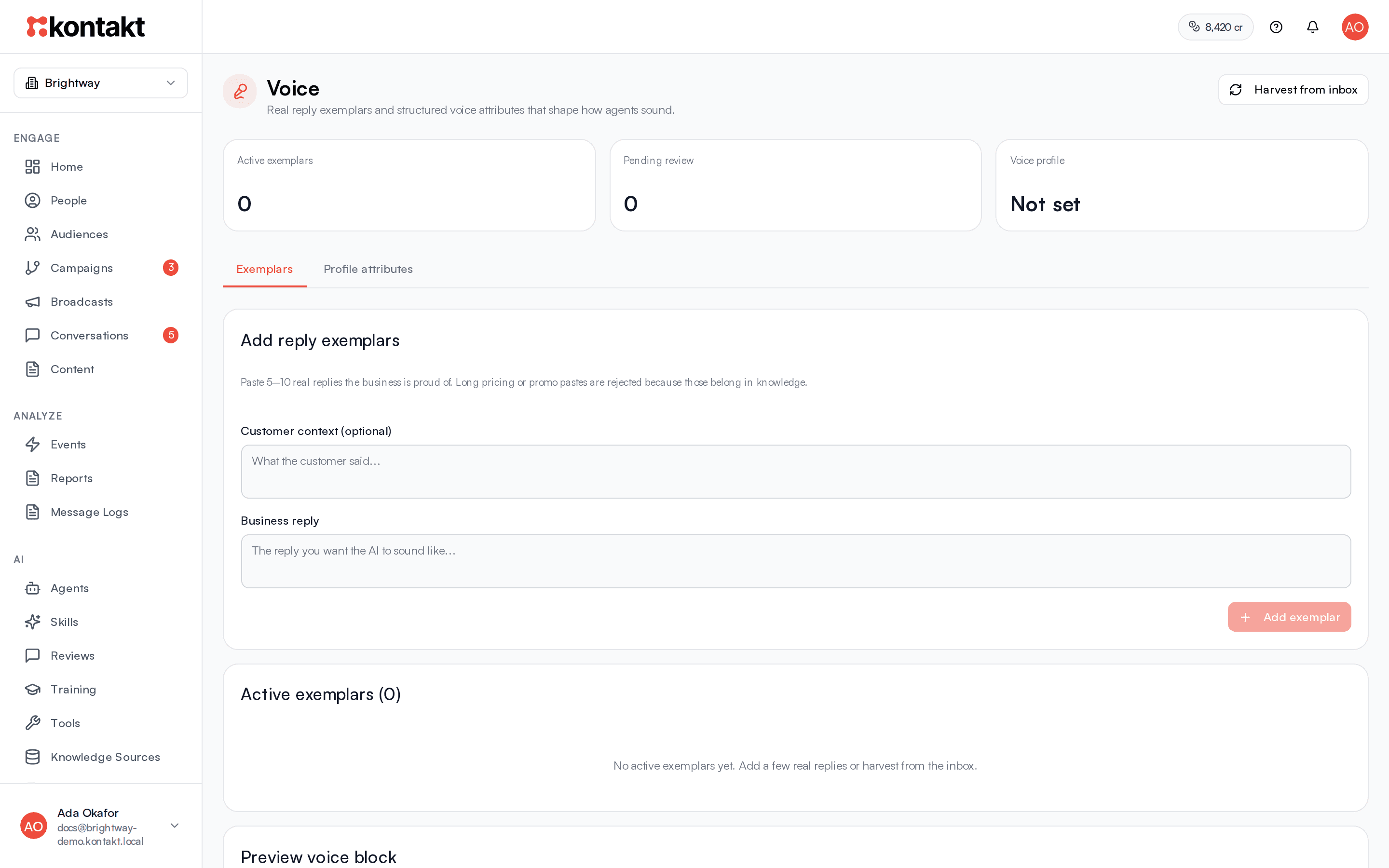
Go to AI / Voice. The top of the page shows Active exemplars, Pending review, and whether your Voice profile is Ready or Not set.
Add a reply
On the Exemplars tab, under Add reply exemplars, optionally paste what the customer said into Customer context (optional). Paste your team's reply into Business reply.
Save it
Select Add exemplar. It appears under Active exemplars and is used straight away.
Repeat
Add 5 to 10 replies across different situations. Agent health suggests adding more until you have at least five.
What is not accepted
Exemplars must be 400 characters or fewer. Long promotional or pricing messages are rejected, because they are facts rather than voice. Put those in Knowledge.
Harvest from your inbox
Select Harvest from inbox to have Kontakt collect replies your team sent in the last 21 days on WhatsApp, Instagram, Messenger, the web widget, and hosted chat. It looks at up to 80 recent replies, skips any that are too long or already saved, and pairs each with the customer message before it.
- Short, everyday replies, such as greetings and delivery updates, are added as active straight away.
- Everything else lands under Pending harvest. Select Approve to use it or Retire to discard it.
To stop using an active exemplar, select its trash icon.
Set the voice profile
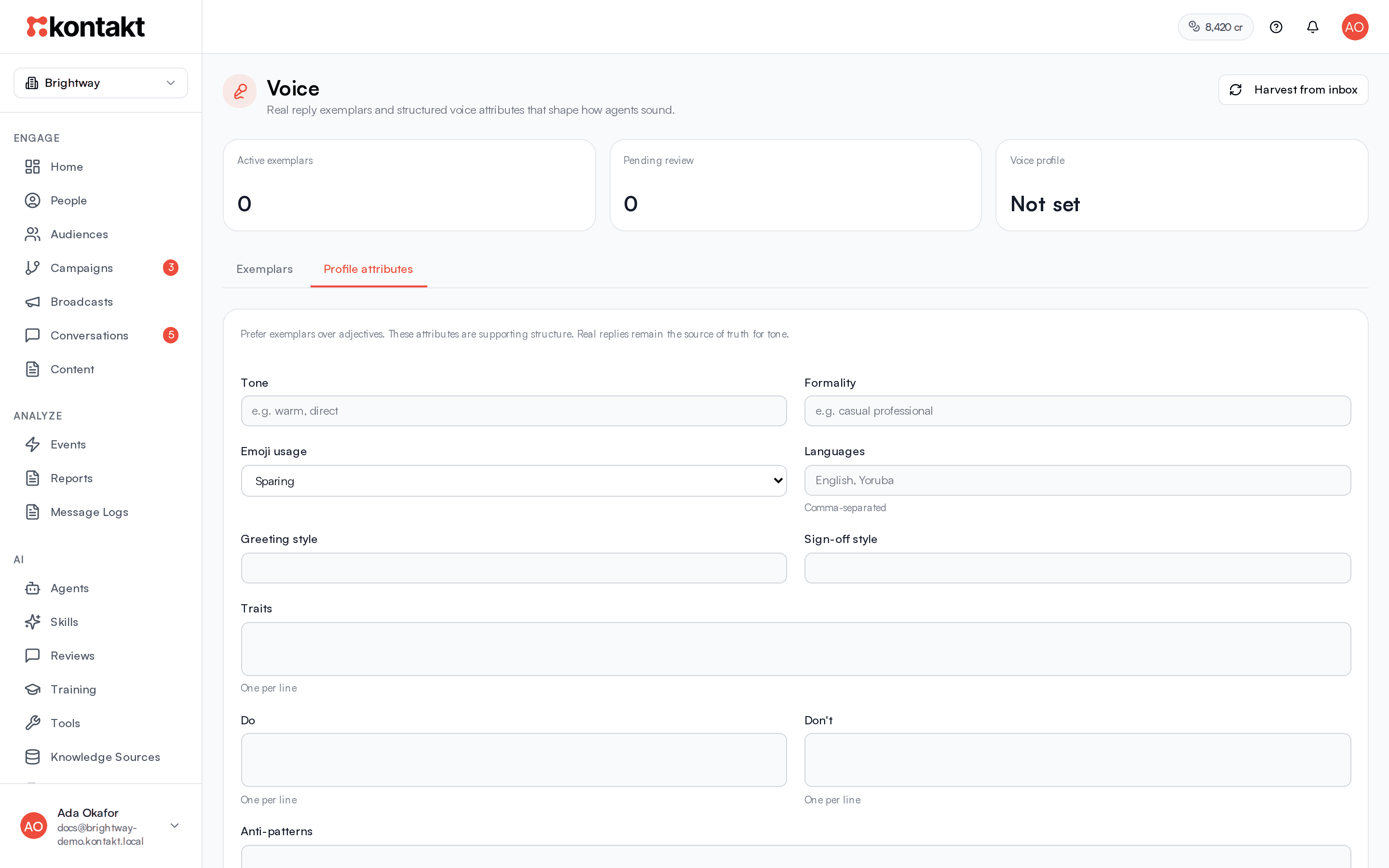
Switch to the Profile attributes tab. The profile adds rules the examples cannot show on their own. Prefer exemplars for tone and use the profile for hard rules.
| Field | Use it for |
|---|---|
| Tone | A short description, such as "warm and direct". |
| Formality | How formal replies should be. |
| Emoji usage | None, Sparing, or Moderate. |
| Languages | Comma-separated, such as "English, Yoruba". |
| Greeting style and Sign-off style | How you open and close messages. |
| Traits | One per line. |
| Do and Don't | One rule per line, such as "Use the customer's first name". |
| Anti-patterns | Phrases or habits the AI must never use, one per line. |
Select Save profile. A training import can also fill in the profile for you.
How voice is used
For each customer message, Kontakt picks up to four active exemplars that best match what the customer said, and adds them to the skill's prompt together with your profile. Greetings favour greeting examples. The AI is told to match the examples rather than write in a generic assistant style.
On WhatsApp, Instagram, and Messenger, the AI is also told to keep replies short and conversational, avoid Markdown formatting, and only use emoji if your examples do.
The agent Persona still applies. Use the persona for what the agent is, and voice for how it writes.
Preview what the AI sees
Under Preview voice block, type a sample customer message and select the play button. Kontakt shows the exact voice guidance it would add to the prompt for that message, including which exemplars it picked.
Troubleshooting
Replies still sound generic
Check that you have at least five active exemplars covering common situations, and use Preview voice block to see which are being picked. Rate replies with Sounds like us? in the Playground to track progress on Agent health.
An exemplar was rejected
It was over 400 characters, or it looked like a long promotional or pricing message. Shorten it, or move the content to knowledge.
Harvest found nothing
Harvest only looks at replies sent by people, not the AI, in the last 21 days on messaging channels. If your team has not replied there recently, add exemplars by hand.