Fulfillment providers
Fulfillment providers deliver real-world rewards. A journey's Disburse Reward step picks the provider for the reward type and sends the reward to the customer.
Use fulfillment providers when a journey should give a customer something outside Kontakt, such as airtime for completing a survey or a cash reward for a referral. You set up one or more providers per reward type under Settings / Fulfillment Providers, then add a Disburse Reward step to the journey. The step routes to the right provider automatically.
Before you start
- A role that can manage fulfillment providers.
- An account with the provider and its API credentials, or an HTTPS endpoint of your own for Custom Webhook.
- Funds in your provider account. Kontakt sends the instruction; the provider pays out from your balance.
Reward types and adapters
| Reward type | Adapter | Credentials |
|---|---|---|
| Airtime | Sochitel Airtime (Nigeria) | Key ID and Private Key (the full PEM key, including the BEGIN and END lines) |
| Data Bundle | Sochitel Airtime (Nigeria) | Key ID and Private Key |
| Mobile Money | Flutterwave Transfers | Secret Key |
| Bank Transfer | Paystack Transfers or Flutterwave Transfers | Secret Key |
| Custom Webhook | Generic Webhook | Webhook URL |
| Manual | Manual Disbursement | None |
Credentials are stored on the provider and used only to send disbursements.
Add a provider
Open Fulfillment Providers
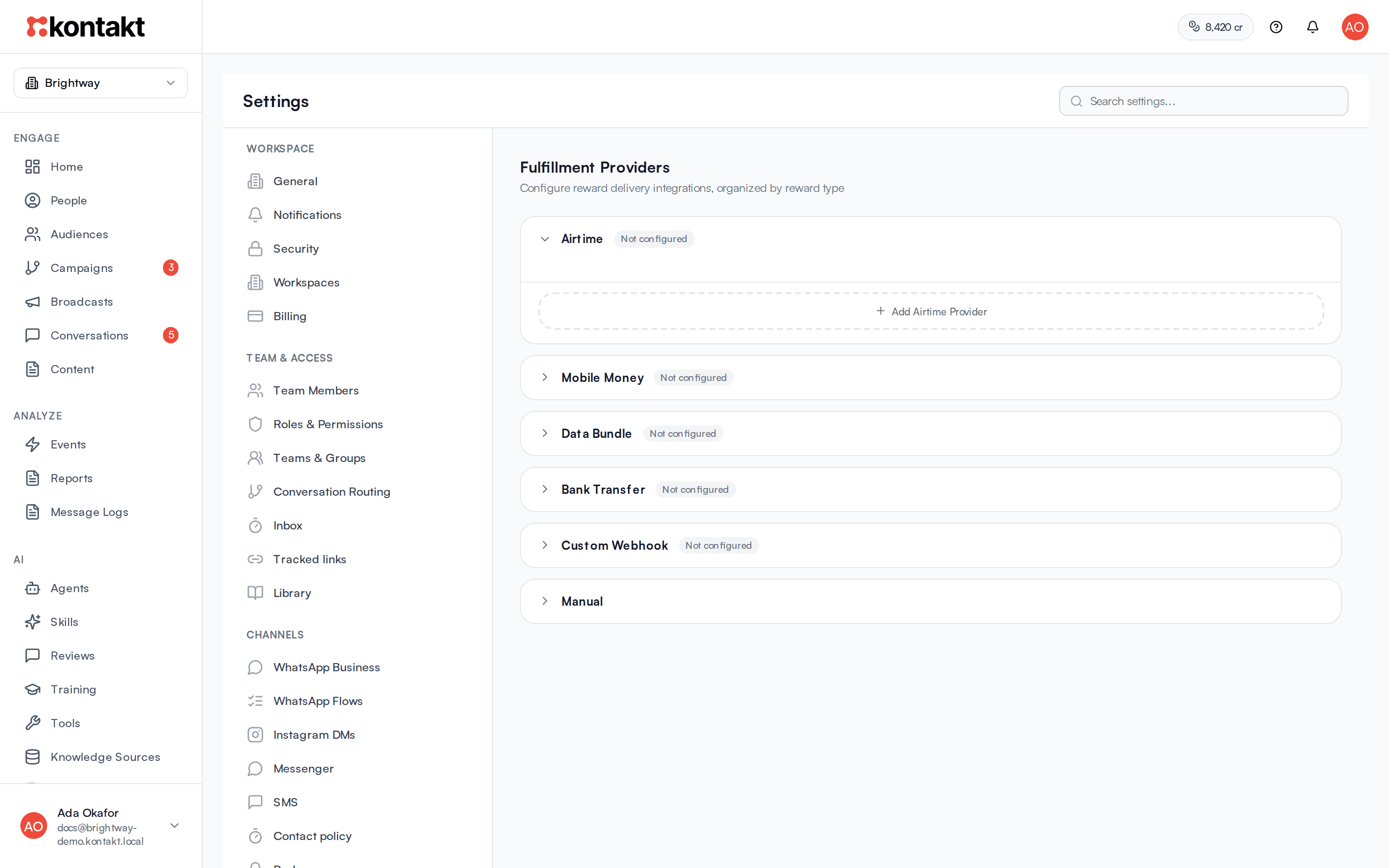
Go to Settings / Fulfillment Providers. Providers are grouped by reward type. Click a reward type to expand it.
Add the provider
Click Add Airtime Provider (the button names the reward type you expanded). Enter a Provider Name, choose the Adapter, and fill in the credentials. Click Save.
Check the credentials
If a credential is missing, the provider shows Needs credentials. Click Configure, fill in the fields, and click Save Credentials.
Activate it
New providers start with the status testing. Click Activate when you are ready. Use Disable to stop using a provider without deleting it.
Choose the default
If a reward type has more than one provider, click Set Default on the one to use first.
Testing providers send real rewards
Providers in testing status are used by live journeys, just like active ones. Use your provider's test credentials while you build, and switch to live credentials before launch. Only disabled providers are skipped.
Disburse a reward from a journey
Add Disburse Reward from Actions in the journey builder and set:
- Reward Type: the panel shows whether an active provider is configured for each type.
- Amount (required): a number, or Liquid such as
{{ code.merged_custom_fields.reward_amount }}. - Currency: for example
NGN,KES, orUSD. Leave it empty and Kontakt uses the provider's currency,NGNfor Sochitel. Other providers getUSD, so set it for them. - Recipient: defaults to the customer's phone. Supports Liquid.
- Label (optional): saved on the disbursement record. Supports Liquid.
The step has two exits: Success, and No Provider or Failed. Connect the second exit to a message or a task for your team so failed rewards get handled.
How providers are chosen
For each disbursement Kontakt picks one provider for the reward type: the default first, then the oldest provider that is not disabled. If no provider is set up for that reward type, the step takes the No Provider or Failed exit straight away.
Kontakt makes the delivery attempt when the step runs. If the provider reports a failure, the journey takes the No Provider or Failed exit and the disbursement shows as Retrying. Kontakt tries again about 30 seconds later, then about 2 minutes after that. If the third attempt also fails, Kontakt moves the disbursement to your next provider for that reward type, if you have one, and starts again. Otherwise the disbursement shows as Failed.
What each adapter expects
Sochitel Airtime (Nigeria). The recipient is a Nigerian mobile number. Numbers that start with 0 are converted to 234 format, and the network is detected from the number. If the network can't be detected, the disbursement fails.
Paystack Transfers. The Recipient must be a transfer recipient code from your account with that provider, not a phone number. Store the code in a custom field and reference it with Liquid.
Flutterwave Transfers. The Recipient is sent as the account number. The bank code cannot be set in the app today, so contact support@usekontakt.com before relying on this adapter.
Generic Webhook. Kontakt sends a POST with Content-Type: application/json to your Webhook URL:
{
  "recipient": "+2348030000000",
  "amount": 500,
  "currency": "NGN",
  "metadata": { "node_id": "node_abc123", "label": "Airtime reward for code scan" }
}
Return any 2xx status to mark the disbursement completed. If your JSON response includes reference or id, Kontakt saves it as the external reference. Any other status counts as a failure. The Auth Header (optional) field is not sent with requests today, so protect your endpoint another way, for example with a long random path.
Manual Disbursement. The Manual reward type needs no setup in the app. Disbursements of this type currently take the No Provider or Failed exit, so use that exit to notify your team.
Track disbursements
Open the journey's analytics and choose the Disbursements tab. It shows Total Disbursed, Pending, and Failed, and lists each disbursement with its Date, Customer, Reward Type, Amount, Recipient, Status, Attempts, and Ext. Ref. Filter by status: Pending, Retrying, Completed, or Failed.
Troubleshooting
The step always takes the No Provider or Failed exit
Check that the reward type in the step has a provider that isn't disabled, and that the provider doesn't show Needs credentials.
Airtime fails with a network error
The recipient isn't a Nigerian mobile number the adapter recognises. Check the phone on the person's profile, or set Recipient to the right field.
The amount is wrong
Check Currency. When it is empty, Sochitel pays in NGN and other providers in USD. Enter the amount in the currency's main unit, not in minor units such as cents.