Agent health
Agent Health brings your AI quality signals into one place, so you can see whether answers are getting better or worse and test changes before customers notice.
Agent Health combines four kinds of signal: ratings people give AI replies, results from your quality suite, automated checks on a sample of real replies, and your voice setup. It turns them into one score, lists the most common problems, and suggests fixes.
Before you start
- You need a role that can change workspace settings.
- Have at least one active agent with mounted skills. Quality runs send test messages through your real agents.
Read the page
Go to AI / Agent Health.
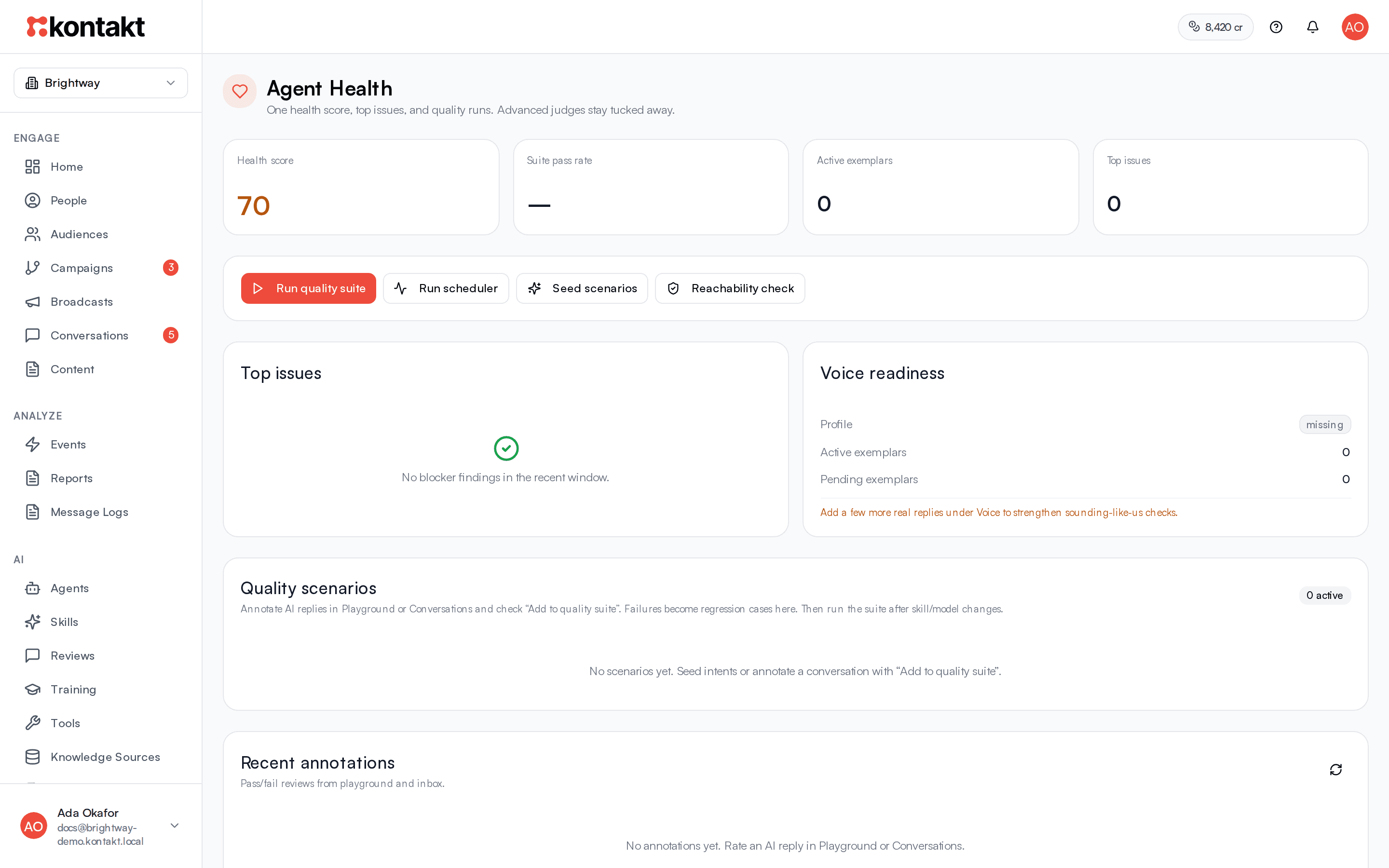
The four numbers at the top are:
- Health score, out of 100. Green is 80 and above, amber is 60 to 79, and red is below 60.
- Suite pass rate: the share of quality suite checks that passed in the last 14 days.
- Active exemplars: how many reply examples are in use under Voice.
- Top issues: how many distinct problems were found.
How the score is worked out
The score starts from a baseline and goes up when you have a voice profile, when you have active exemplars (more for five or more), and as your suite pass rate and automated check pass rates rise. It goes down for each top issue, up to a limit. Fixing top issues and adding exemplars are the quickest ways to raise it.
Sections
- Top issues: the failure modes that came up most often in failed ratings over the last 30 days, plus any automated check passing less than 85% of the time. If there are none you see No blocker findings in the recent window.
- Voice readiness: whether your voice profile is set and how many exemplars are active and pending. Under five active exemplars, the page suggests adding more.
- Quality scenarios: the test conversations in your suite. Scenarios created from ratings are marked Review.
- Recent annotations: the latest pass and fail ratings from the Playground, the inbox, and supervised edits.
- Recent quality runs: each suite run with its status.
- Suggested fixes: improvement proposals you can Approve or Reject.
- Show advanced details: per-check pass rates and a breakdown of recent AI activity.
Build and run your quality suite
Add scenarios
Select Seed scenarios to add four starter scenarios: a price question, a delivery question, a capability question, and a setup question. Seeding only works while the suite is empty.
The best scenarios come from real problems. When you mark a reply Fail in the Playground or Conversations, leave Add to quality suite ticked and the conversation becomes a scenario. See Reviews and training.
Run the suite
Select Run quality suite. Each scenario is replayed as a new test customer through your live agents and skills. Kontakt checks that the message was routed, that the reply avoids banned phrases and stays within length, and scores it for voice and accuracy.
Read the results
The run appears under Recent quality runs, and Suite pass rate and Health score update.
Rerun after changes
Run the suite again whenever you change a skill, the router settings, or the model. After you save router changes in AI settings, Kontakt offers Run Quality Suite for this reason.
Quality runs use credits
Every scenario in a run produces a real AI reply in a test conversation, and each reply is charged at $0.03. Large suites cost more to run. See Billing.
Run the full check cycle
Run scheduler runs every check in one go:
- Harvests new reply examples from your inbox, as Harvest from inbox does on the Voice page.
- If your agents handled real traffic in the last three days, scores a small sample of recent real replies.
- Seeds starter scenarios if the suite is empty, then runs the quality suite.
- Checks your setup for active skills not mounted on any active agent, skills that reference tools that no longer exist, and agents with near-duplicate names.
Problems found by the setup check appear under Suggested fixes, such as "Mount or deactivate skill" for an unmounted skill.
Reachability check
Reachability check runs only the setup check: skills not mounted on any active agent, skills allowed to use tools that are no longer available, skills with near-identical descriptions that the router may confuse, and duplicate agents. Unmounted skills are added to Suggested fixes.
Suggested fixes
Each suggestion shows why it was raised and what it proposes. Select Approve to apply it or Reject to dismiss it. Approving a suggestion that changes a skill adds the proposed text to the end of that skill's procedure. Check the skill afterwards in AI / Skills.
Troubleshooting
The health score is low but customers seem happy
The score rewards voice setup and a passing suite. Add five or more exemplars, set a voice profile, seed scenarios, and run the suite. A workspace with no runs and no exemplars stays near the baseline.
Every scenario fails routing
Check that Workspace AI is on, that your agents are active with skills mounted, and that skills have clear descriptions. Scenarios that are not tied to a specific agent, such as the seeded starters, go through normal routing. That includes the Workspace AI switch and the routing confidence threshold, so a vague scenario can be handed to a person and fail.
Top issues keep showing an old problem
Top issues cover failed ratings from the last 30 days. Fix the skill or knowledge, rerun the suite, and the issue drops off as newer passing results come in.