Tracked links
Tracked links keep a person connected across systems. When an agent shares a form link from a conversation, the link carries who the customer is, so whatever they submit lands on the same profile.
This page covers three related things:
- Tracked links your team inserts into conversations, so forms and landing pages know which customer opened them.
- Click tracking in SMS and WhatsApp messages, so you can see who tapped a link.
- Order attribution, how Kontakt credits a store order to the journey message that led to it.
Before you start
- You need a role that can change workspace settings to manage tracked links. Any teammate who can read conversations can insert them.
- To capture form submissions, your form or site needs to send them to Kontakt with an API key. See Ingestion.
- Order attribution needs orders in Kontakt, from Shopify or the API.
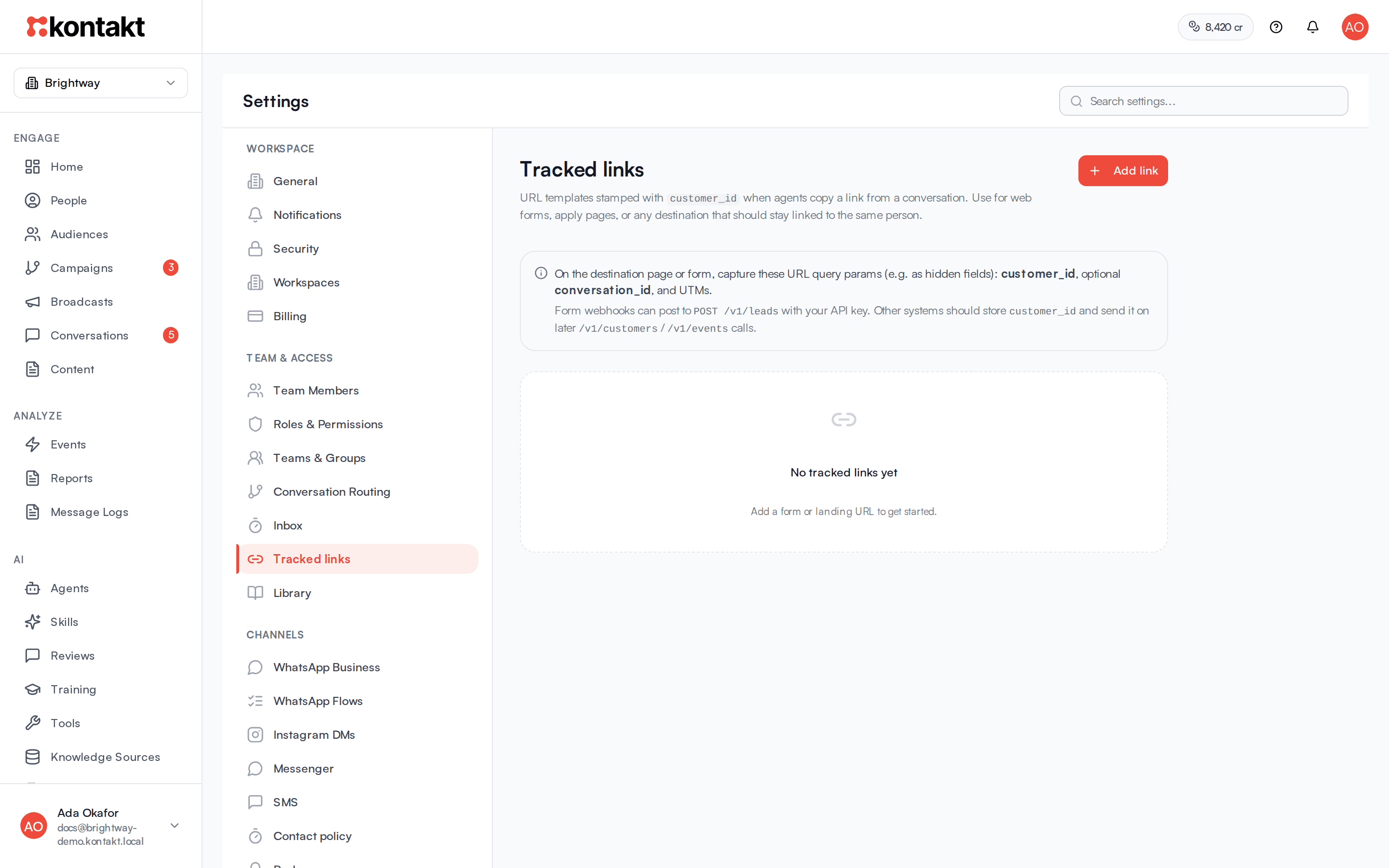
Add a tracked link
Open the settings
Go to Settings / Tracked links.
Add the link
Click Add link. Enter a Name your team will recognise, for example "Product signup form", and the Base URL, the full address of the page including https://. Click Create.
Capture the values on your page
On the destination page or form, read these values from the address and keep them, for example as hidden form fields: customer_id, conversation_id (optional), and the UTM values.
Each link in the list has a switch to turn it on or off, a button to copy the base URL, and a button to disable it. Disabled links stay in the list as Inactive and are hidden from the inbox.
Share a tracked link from a conversation
Open the conversation
In Conversations, open a chat with a customer.
Insert the link
Click the Insert tracked link button in the composer and pick a link. Kontakt adds the personalised address to your reply and copies it to your clipboard. You see "Tracked link added to message".
Send
Send the reply as usual.
The link Kontakt builds is your base URL plus:
| Value | What it holds |
|---|---|
customer_id | The customer's ID in Kontakt. |
conversation_id | The conversation the link was sent from. |
utm_source, utm_medium, utm_campaign, utm_content, utm_term | Where the conversation came from, for example the ad that started it, or the customer's first known source. Only values Kontakt knows are added. |
If your base URL already has one of these values, Kontakt keeps yours and does not overwrite it.
What happens when the form is submitted
Send the submission to Kontakt as a lead, including the customer_id. Kontakt updates that same customer instead of creating a new one, and records a lead_captured event. You can start a journey from that event, for example to confirm receipt or assign a follow-up. Other systems can store the customer_id and send it with later customer or event updates. See Ingestion.
Click tracking in SMS and WhatsApp
SMS and WhatsApp don't report clicks, so Kontakt swaps each link for a short link of its own, such as https://go.usekontakt.com/l/Ab3dE5gH. Every person gets their own short link. When they tap it, Kontakt records the click and sends them straight on to your page.
Where it's on
| Where | What is tracked | Setting |
|---|---|---|
| SMS broadcasts | Links in the message | Track link clicks on the Message & Template step, on by default |
| WhatsApp broadcasts | Links you fill into template variables | Track link clicks on the Message & Template step, on by default |
| Journey SMS and WhatsApp steps | Links in the message and in template variables | Track link clicks on the step, on by default |
| WhatsApp template link buttons | Taps on the button | Track clicks on the button in the template |
A template button with Track clicks is tracked wherever the template is sent: broadcasts, journeys, the inbox, AI agents, and the API. Turning it on or off sends the template to WhatsApp for approval again. See Content and templates.
Messages sent with the API keep their text exactly as you send it. Only tracked template buttons are filled in.
What the page receives
The short link opens your original address with utm_source=kontakt, utm_medium set to sms or whatsapp, utm_campaign, and a kk_t value that identifies the exact message. UTM values already in your link are kept. The kk_t value lets an order from that visit be credited to the message, as described below.
What counts as a click
Kontakt counts a person once per link in Clicked and People who clicked, and counts every tap in Clicks. It ignores link previews, such as the preview WhatsApp builds when a message arrives, security scanners, and visits in the first few seconds after sending.
Where you see it
- A broadcast's page shows Clicked, Clicks by link, and when each recipient first clicked. See Broadcasts.
- A journey's Analytics shows Link clicks (SMS and WhatsApp). See Journeys.
- The person's first tap on each link also records a
message.clickedevent on their profile, as email link clicks do. Journeys can start on it, wait for it, or count it as a goal, and audiences can filter on it. See Events Kontakt records for you.
SMS length
Each short link is about 37 characters. A long link gets shorter, but a short one can get longer, which can push a text into an extra part. Turn off Track link clicks if every character counts.
How orders are credited to messages
When an order arrives, Kontakt looks at the marketing messages its journeys sent to that customer in the previous 7 days, and credits the order to one of them:
- Code. If the order used a discount code that was in one of those messages, that message gets the credit. This covers codes from Unique code to include and from Discount code in this message. See Codes.
- Link. Otherwise, if the customer arrived on your store through a link from one of those messages, that message gets the credit.
- Influenced. Otherwise, the most recent of those messages gets the credit.
Each order is credited once. If the order is later refunded or cancelled, the credit is removed.
Links in journey SMS, WhatsApp, and email messages are tagged automatically, so the link step works without extra setup. Kontakt adds utm_source=kontakt and utm_campaign with the journey's ID if they are not already there, and a kk_t value that identifies the exact message.
Which messages are tracked
Order credit is based on marketing SMS, WhatsApp, and email messages sent by journeys. Transactional messages are not credited.
Where you see it
- The journey's Analytics shows Attributed orders with Messages sent, Orders, Revenue, and Order rate.
- A customer's Purchases card in People tags each credited order as code, link, or influenced.
Troubleshooting
The Insert tracked link button shows no links
Add a link under Settings / Tracked links, or switch an inactive one back on. Tracked links are not available in group chats or in conversations that are not linked to a customer.
Form submissions create a new person
Check that your form passes customer_id through to Kontakt. If the field is missing, Kontakt matches on email or phone instead, and creates a new person if neither matches.
A link in my SMS was not tracked
Kontakt only changes links that start with http:// or https://. Write https://shop.example.com, not shop.example.com. Check that Track link clicks is on for the broadcast or step.
A WhatsApp button shows no clicks
Open the template and check that Track clicks is ticked under the button, and that WhatsApp approved the template after you ticked it. Buttons whose URL contains a placeholder can't be tracked.
A WhatsApp button opens an older Kontakt address
The button's address was fixed when WhatsApp approved the template, and templates approved before November 2026 use an older address such as kontakt-api.onrender.com. Taps still count. To switch the button to go.usekontakt.com, open the template, click Edit Template, choose Create New Version, and submit it. The template keeps its name, so broadcasts and journeys that use it don't need changing.
An order was not credited to my journey
- The order arrived more than 7 days after the last marketing message, or the customer received no marketing SMS or email from a journey.
- The message was Transactional.
- Your store strips the query string from links. Tagged links need the
kk_tvalue to survive to checkout for the link match; otherwise the order may still be credited as influenced.